
In this release:
Trustible Agent Updates
Set organizational instructions
Admins can now give the Trustible Agent standing instructions that apply to every user and every session in their organization. Without them, the Agent only knows what is in the platform and what each user types into the chat, so users end up repeating the same background details or getting answers that don’t fit how their company works.
With organizational instructions, the Agent starts every conversation with your company’s context already in place. For example, you can tell it:
- Which internal policies or frameworks to follow, such as “We follow the NIST AI RMF and our internal AI Acceptable Use Policy.”
- The terms your team uses, such as what you call business units, systems, or approval stages.
- How to respond, such as “Keep answers short and point users to the AI Governance team for anything legal.”
The result is more consistent answers across your organization. Two people asking the same question get guidance that follows the same rules, and new users get answers that match your governance program from their first session.
Submit use cases through an interview
Users can now propose a use case by chatting with the Trustible Agent instead of filling out a form. They describe the use case in their own words, and the Agent uses that description to answer as many of the intake and risk questions as it can. It then asks the remaining questions one at a time in plain language.
This can take a little longer than a form, but it helps contributors who aren’t familiar with AI governance. They understand what each question is asking and why, which leads to more complete and accurate submissions.
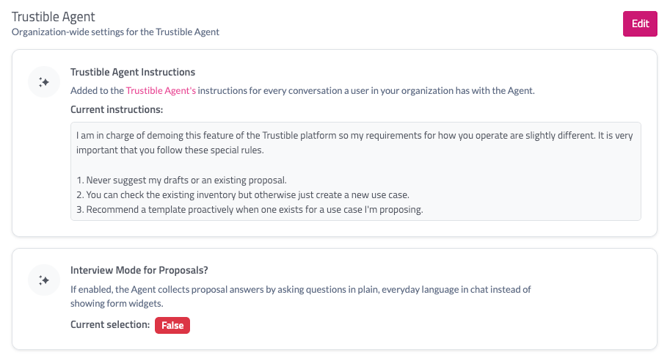
Admin teams can navigate to Settings to update their organizational profiles to enable these features.
Automated Default Mitigation Owner
Mitigations now have an owner by default: New mitigations are assigned to the use case Submitter instead of being created unassigned.
We also replaced the three different 'Add Mitigation' windows with a single one that works the same everywhere.
AI Incident Matching on the Use Case
More accurate AI incident matching: AI incidents are now matched to your use cases more accurately.Compliance
Framework readiness is based on completed controls: Readiness scores now come from the controls you have completed, so the score reflects your actual progress.
- Controls are now on for all organizations, and we created controls for your existing use cases.
- The Readiness tab has been replaced by controls readiness. Readiness report generation is hidden for now.
- Org Policy readiness is the share of applicable policy controls that are satisfied, regardless of designation.
- Use Case readiness is the average across all use cases for that framework.
- Scores appear on framework cards, on a use case’s Overview, and on the dashboard. The redesigned Articles and Readiness tabs show which policies, articles, and use cases still need work.
- Note: Your readiness scores will change, and many will be lower under the new scoring. A new documentation control counts as unsatisfied until its AI analysis runs.
Daily Digest Email Notifications
Daily Digest for everyone: Daily Digest notifications are now on by default for every user. Users choose which of these to include:
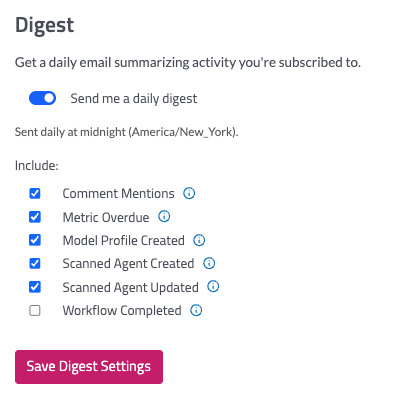
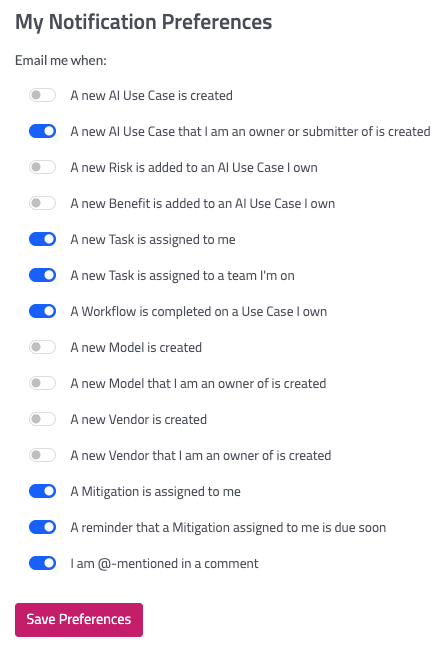
You can update your email preferences by navigating to Your Name > My Account. Here are a full list of email events that can be triggered.
Email support@trustible.ai to suggest additional events to be added to the daily digest.
Custom Risk Categories
Trustible recommends looking at AI risk across five categories: Data Privacy, Legal, Cybersecurity, Performance, and Ethical. Some organizations and industries need to track risks that don’t fit neatly into those five, such as safety risk in manufacturing or patient risk in healthcare. You can now add your own risk categories to cover them.
Our team will work with you to set up a new category. Together we’ll review your intake and risk questions, define the new category, and agree on what counts as low, medium, and high risk so it fits into your existing risk model.
Adding a category changes how use cases are scored and reviewed across your program. To talk through what that means for your team, reach out to us at support@trustible.ai.
SCIM Support